Tuesday, May 12, 2009
Installing nvidia/ati video drivers in Ubuntu
Here's what I did:
1. Enabled the ubuntu's "universe" and "multiverse" repositories.
-it's under System > Administration > Software Sources.
in the Ubuntu Software tab, check the second box that says:
Community-maintained open source software (universe)
and the fourth tab:
Software restricted by copyright or legal issues (multiverse)
Click Ok > Reload > Close
2. Install Envy by typing the code in the terminal:
sudo apt-get install envyng-gtk
..and now were done installing envy
3. Open Envy by clicking it in
Applications > System tools > Envy
or if in case its not therem you may type the following code in the terminal:
sudo envyng -t
4. Follow on-screen instructions.
5. reboot..
Everything's done. Thats how easy it is to install nvidia and ati drivers in Ubuntu.
since Envy doesnt work with 64bit edition here are the steps to install ur nvidia drivers in ubuntu.
sudo apt-get update
sudo apt-get upgrade
okay now try this to fix your problem
You will have to remove the restricted modules first by...
logging in at the command prompt when x doesn't start...or sudo /etc/init.d/gdm stop if you have x running.
then ctrl alt F1 to get to a command prompt
sudo apt-get --purge remove nvidia-glx* nvidia-settings linux-restricted-modules
sudo rm /etc/init.d/nvidia-*
sudo sh NVIDIA-Linux-x86_64-100.14.11-pkg2.run
just answer yes to all questions asked by the installer.
It should now let you log in to the desktop by typing startx and your nvidia driver
will be installed.
1. Enabled the ubuntu's "universe" and "multiverse" repositories.
-it's under System > Administration > Software Sources.
in the Ubuntu Software tab, check the second box that says:
Community-maintained open source software (universe)
and the fourth tab:
Software restricted by copyright or legal issues (multiverse)
Click Ok > Reload > Close
2. Install Envy by typing the code in the terminal:
sudo apt-get install envyng-gtk
..and now were done installing envy
3. Open Envy by clicking it in
Applications > System tools > Envy
or if in case its not therem you may type the following code in the terminal:
sudo envyng -t
4. Follow on-screen instructions.
5. reboot..
Everything's done. Thats how easy it is to install nvidia and ati drivers in Ubuntu.

First, go to System > Administration > Hardware Drivers
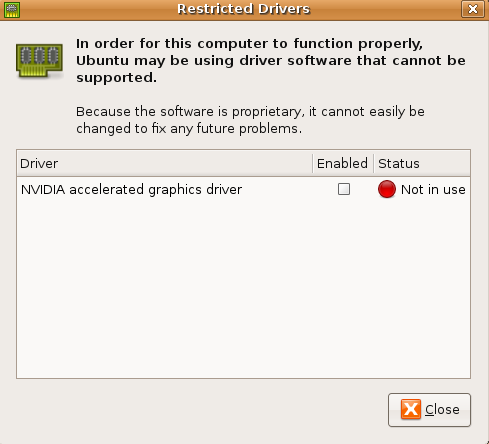
You'll then see that Nvidia drivers are not in use. Check (or tick) the box underneath Enabled to enable the drivers.

You'll then be asked (after a brief explanation about desktop effects) if you want to enable the driver. Click Enable Driver.
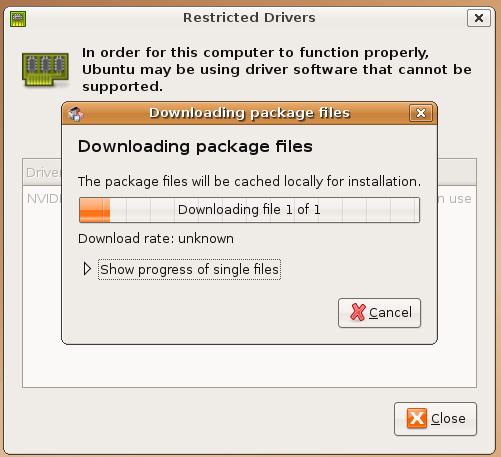
Wait for the installer file to download.
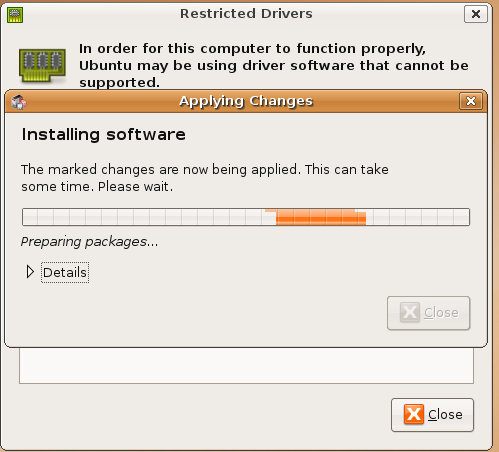
Wait for the drivers to be installed.

Then, click Close once the changes have been applied.

You'll then see that the drivers are enabled and will be available for use upon a reboot.
since Envy doesnt work with 64bit edition here are the steps to install ur nvidia drivers in ubuntu.
sudo apt-get update
sudo apt-get upgrade
okay now try this to fix your problem
You will have to remove the restricted modules first by...
logging in at the command prompt when x doesn't start...or sudo /etc/init.d/gdm stop if you have x running.
then ctrl alt F1 to get to a command prompt
sudo apt-get --purge remove nvidia-glx* nvidia-settings linux-restricted-modules
sudo rm /etc/init.d/nvidia-*
sudo sh NVIDIA-Linux-x86_64-100.14.11-pkg2.run
just answer yes to all questions asked by the installer.
It should now let you log in to the desktop by typing startx and your nvidia driver
will be installed.
// posted by vikaskurup @ 12:18 PM 

Subscribe to Posts [Atom]